An entertaining 9-minute video by Shloop that starts with a common mistake of typing in an English mode on a Korean keyboard, but then goes through a bunch of other fun and light input internationalization stories:
This first one – in response to pressing the volume buttons – feels world-class. Subtle responses to buttons being pressed, nice haptics, good physics:
This one – stretching of the control center – made me incredulous. The performance and physics of it all are good and fluid, but this feels like absolutely the wrong thing to do here. I think it’s as designed, but it feels buggy to me. Maybe I’m oversensitive to stretching type and shapes like this, but I can’t stand how icky it feels. I am not sure I have seen another place in iOS 26 where elements would stretch in such a cheap way:
And this one – tapping on the album cover to make it show and hide – is bad in perhaps every possible way. It feels designed poorly and engineered poorly, like an HTML approximation of a real thing. All sorts of bad curves and sudden switches, slight reorientations of UI, even some flickering of interface elements at the bottom. It feels so rough I would probably just do a hard switch, no transition, until I got this right. After all, no animation is better than bad animation, and this is not responding to fingers in real time (when the user controls the “speed,” and you absolutely need a transition):
Ultimately I don’t know if this is “as designed,” or rushed, or what are the causes. But It’s interesting and a bit hard to realize that these days even animations in iOS 26 – once, I believe, a staple of good design and execution – are all over the place.
This is a really funny story happening in the online universe of Final Fantasy 11:
Once killed, a notorious monster shouldn’t respawn until after the next monthly tally, but lately defeated notorious monsters in Limbus have been reappearing early. That’s because, Square Enix said, “the server-side data recording the defeat status of notorious monsters is unexpectedly being cleared.”
Thus, there’s only one way to guarantee no players are robbed of hard-earned Limbus loot: Square Enix is dispatching Game Masters to personally murder every notorious monster in Limbus so the FF11 servers can properly verify that they’re really, truly dead.
“To achieve this, Game Masters will visit each World in sequence and defeat each motorious monster individually,” Square Enix said. “We apologize for the inconvenience.”
I know this is not a bug fix per se, but it’s interesting to be doing some bug cleanup from the inside.
I recently learned of the OG App from 2022, which offered an ad-free, simpler experience to users frustrated with Instagram changes.
The app didn’t last – it couldn’t last – but it was a fascinating statement.
In a different corner of the internet, Michael Leggett, one of the former Gmail designers, created Simplify – an alternative “shell” to Gmail:
Hundreds of improvements (small and large) to streamline, simplify, and enhance Gmail’s design and functionality. Hide the features you don’t use, customize the ones you do including setting the list and message width and fonts.
Bad design can occur for a number of reasons including but not limited to:
Our needs as users are not well understood, prioritized, or aligned with the company’s goals.
Entropy: The natural decline of products over time as the vision decays or blurs and new features are conceived without consideration of the whole and added faster than the system’s overall design and architecture can evolve to support them.
Good design is hard. Good design is more than making a product pretty. It is about having the right capabilities in an intuitive, respectful, and well-crafted offering. I hope to expand on this topic in future posts.
I know ad blockers and “reader modes” exist, but these alternative shells go much further and change the original app’s design. I wonder what other examples of that are out there.
After James Moylan’s death in December, we were reminded again of the Moylan Arrow, the little arrow telling you which side of your car has the little fuel door:
I started wondering: what would be the conceptual equivalent of this in software? My best guess would be iOS offering to fill the one-time code from a recent SMS:
This is what it has in common with the Moylan Arrow:
everyone benefits from it
it happens all the time
it solves an actual little (but not too little) frustration
it’s there at the right place at the right time
it is relatively low-tech (it’s not an overdesigned or an overengineered solution)
once you know it’s there, you will love it forever
Curtosis on Mastodon unearthed the original 2019 Twitter thread from one the creator of the iOS feature, Ricky Mondello (link to XCancel), which I‘m reproducing here:
The idea for Security Code AutoFill came out of a small group of software engineers working on what we thought was a much more ambitious project. It wasn’t a PM, it wasn’t just one person, and it wasn’t what we set out to do initially.
It started as a small side idea we had while designing something very different. We jotted it down, tabled it for weeks, and then picked it up after the “more ambitious” project wasn’t panning out. It was hard, but I’m so glad we changed focus.
Even with a gem of an idea, it was still just an idea. Ideas are obviously super important — they’re necessary, but not sufficient. Here, the end result came from the idea, teamwork, and execution.
Years later, I’m still so proud of the team for making this feature happen. The team combined expertise from several areas to ship magic that worked on day 1, while asking nothing of app and website developers, without giving anyone your text messages. This still inspires me!
To every one of the folks who made this happen, I’m still in awe. Y’all are the best. <3
Addendum: FAQs
- “SMS is bad.”
↪ I know.
- “MITM.”
↪ I know.
- “FIDO is better.”
↪ It’s complicated, but acknowledged; I totally get it.
- “Android did it first.”
↪ Nah. Details matter. Privacy matters. And clipboard != AutoFill.
- *negativity*
↪ Not now. :)
I asked others on social and here are some other contenders I liked:
The indicator that alerts you of Caps Lock when typing passwords
I read Mike Monteiro’s book of pre-pandemic essays called The collected angers. The book has less to do with the subject of this blog, but I grabbed a few quotes that resonated with me and seemed relevant.
In order not to make it too reductive, I’m also linking to the original essays for those who want to follow up:
The worst feedback you can get from a client is “Wow. It looks like you worked really hard on this!” Stop using your work like a time card. If you did it right, it looks like it was effortless. It looks like it’s always existed. And the client will probably be irritated that they paid you for 30 hours of work to do something that looks like it took an hour. Which it did. They’re just not seeing the 29 hours of bad design that got you to that one hour of good design. And for the love of god, please don’t show them those 29 hours of bad design. A presentation is a shitty place for a sausage-making demonstration, and you’ll just come across as a defensive, unsure person needing validation.
Learn how to steal. Be aware of your history. Design is the oldest profession in the world. You’re not the first person to tackle whatever design problem you’re tackling. See how others tackled it. Take the best solutions you find and improve on them. Don’t burn time solving things from scratch. Make use of what others have learned.
I liked the angry website Bugs Apple Loves because it’s hitting on something that got me worried in recent months: Apple has been bad at bugs for a while now, but we might be overfocusing on giving them crap solely for some of the most visible – even visual – Tahoe stuff.
This is a condensed list at the time of writing, as the site itself doesn’t make it easy to see it:
Mail search doesn’t work
Autocorrect won’t take no for an answer
Apple Pay: card icon changes address
Google Contacts sync is a black hole
AirDrop: Looking for devices...
iCloud Photos: ‘Uploading X Items’
Spotlight: ‘Indexing...’
Personal hotspot won’t auto-connect
Apple Watch widgets won’t let go
iOS text selection is pure chaos
AirDrop shuffles targets mid-tap
macOS 26 window resizing doesn’t work
There are themes here: “the interface doesn’t remember my preference,” and “things move around as I interact with them,” and “some process gets clogged up,” and “a thing gets stuck and doesn’t respond to interface actions.”
What I appreciate about this is that none of this is very “visible” stuff, but the insidious things that add up and bother on the daily basis, chipping away at your flow first and sanity second – which the site tries to quantify via a formula:
I think this is really interesting, even as a satire.
I found it’s really hard, if not impossible, to justify design or experience bugs using the same frameworks as other engineering bugs. As Mike Swanson wrote: “You cannot easily measure the resentment. Or the rage clicks when they smash a button to dismiss another […] pop-up.”
A lot of it is utterly subjective. Various small frustrations add up in non-linear ways. A lot of it doesn’t subscribe to binary “data loss or not” or “does it function or not” classifications. A lot of it feels heavy to fix in terms of context switching, so it’s timeboxed and then discarded when the time box overflows.
I have seen engineers say “Oh, it’s a long-standing bug, it’s been like this for 3 months” as a justification to deprioritize something, while to me it feels like that should be an accelerant. The users have already been suffering for 3 months!
So maybe metrics like these could actually help? Quantifying at least the blastradius (affected users + usage per day) seems valuable, not to mention the embarrassment of seeing something like “9.1 years unfixed by Apple.” (And yes, internal embarrassment and shame should also be a metric.)
This would be harder to do for creators of the site, but easier inside Apple: I would also try to quantify vocal user frustration. One of my tricks when thinking about bugs has been “Notice when your users are really angry about invisible stuff.”
If you plug in a CD drive (he said with a straight face in the lord’s year 2026), and then eject too soon, the system offers this dialog, which allows you to say: Eject whenever you’re done with whatever you have to do.
But more modern media, like SSD drives, don’t show that window. The best case scenario is that you get a dialog box like the 1990s never ended:
It gets worse. Often, you get zero help in identifying what the “programs” actually are. (The word on the street is that it might be stuff like Spotlight indexing, which you can’t really control.)
More often than not I just click Force Eject or jank the drive cable out, which feels really unpleasant. I would guess many people do the same.
So at this point we are two steps worse than the original CD experience, which… wasn’t even that great! A pretty clear improvement on this already exists elsewhere in macOS, and could be reused here – “hey, you don’t have to do anything, just give me a second while I finish up here.”
(Can’t help but notice the discrepancy of visual styles of these windows, and even the inconsistency between calling things “applications” vs. “programs.”)
One of the most potent themes in Stanisław Lem’s writing was the fallacy of first contact.
Lem argued that we are just not ready for an actual meeting with something truly alien. That the most open-minded of us are close-minded on a cosmic scale. That sci-fi made us think that aliens will look like human with prosthetics when good, and insect-like creatures when evil, but sci-fi needs to be self-constrained for all the same reasons; showing us something actually inhuman will immediately render it utterly incomprehensible.
He wrote about it in Eden, and Solaris, and The Invincible, and Fiasco. The last of these is a book I was once so angry at that I threw it at the wall.
It also happens to be my most favourite book, ever.
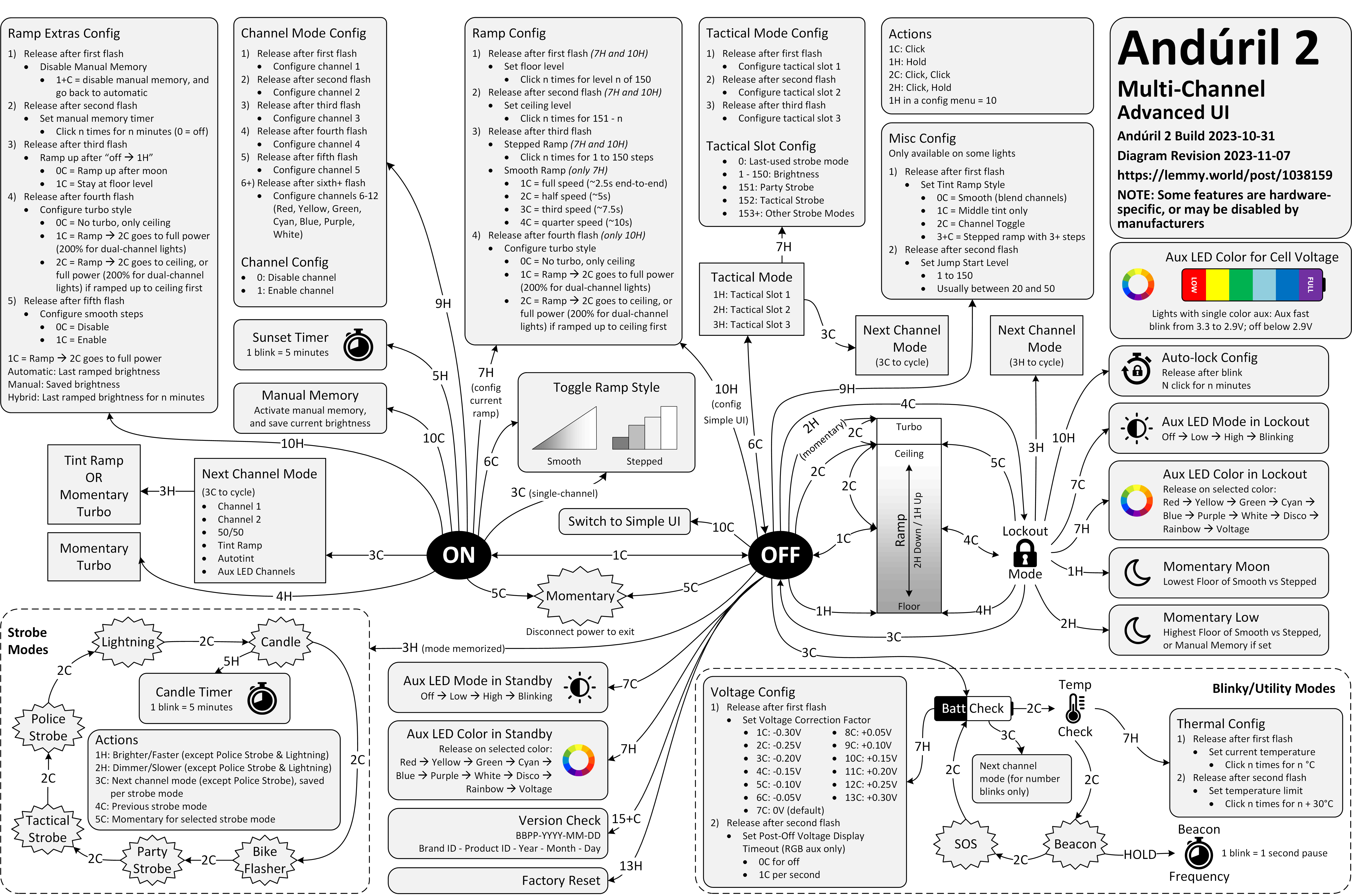
Anyway. This is a diagram for a single-button flashlight called Andúril 2 (larger version):
I saw it for the first time earlier this week. I was speechless. Maybe a little bit in awe. I know I’m supposed to hate this, but this feels so profoundly… alien, that I don’t know if anything I know applies here. I don’t want to judge it by the wrong set of rules. I want to understand the dividing lines between the UI and its explanation. I want to study it more.
Oh, and because I was curious too – this is the flashlight:
This is of course competence porn, made even better by the dry Polish lektor-like delivery. But it’s also a puzzle. I watched this so many times. There are so many great UI lessons in here:
You can absolutely put graphics inside a textbox
Sparklines rule
Slider is still the best UI element in history
Previews don’t have to feel like training wheels
Synchronizing sounds to visuals is so powerful (see: turn signals on a car dashboard)
I found myself thinking about how you’d design something that feels real-time, but also needs to be resilient against typos, and has a distinct “commit” moment (which is what I think those yellow flashes are); some of the best moments in the video are the quick fixes that aren’t narrated.
Ultimately, this also shows how powerful and underrated plain text can be as interface. It’s a bit like designing straight in CSS, operating at the weird intersection of motor memory, creativity, and abstraction. (Is there a CSS editor that feels more like this?)
On top of all of this, the act of building the track this way is also how the finished track would sound like. Amazing stuff.
Remember all these jokes that went like this?
[God looking at a pug dog for the first time] What the hell did you humans do with my bad ass wolf I gave you?
Imagine sitting the creators of the typewriter in front of YouTube and having them watch this video.
I’d guess a lot of people know that the original 1980 Pac-Man ends accidentally with an iconic, glitchy, and impassable “kill screen.” Many people will also nod with recognition at hearing the kill screen is level 256, a number that immediately gives some ideas on what might have happened.
But this fun 11-minute video from 2017 by Retro Game Mechanics Explained doesn’t stop there. It shows, step by step, exactly what is going on when you reach level 256, and how each one of the glitchy things appear on the screen.
It’s a little mesmerizing, like watching a building demolition in slow motion.
Ross designed Input, a coding font superfamily which was very inspiring to me in the day, and taught me that coding fonts could be a place of surprising creativity and innovation.
First of all, Input has four width options: from regular through Narrow to Condensed to Compressed – this not only allows to avoid the “blocky/squareish” nature of many coding fonts, but also, pragmatically, to squeeze in more stuff on mobile screens.
Secondly, since a lot of coding environments didn’t (and maybe still don’t) allow for fine-tuned typography settings, you can bake them into a font upon download – choose a different default line height to be there in the font itself, or have your favorite style of zero just hanging there in the default slot.
Thirdly, serif versions of Input coexist with sans serif, and so does italic, and you can mix them together.
But most important thing comes at the end: you can imagine coding in non-monospaced fonts! What seemed like blasphemy before made so much sense once I put it to use – I still code in Input Sans Narrow (non monospaced) to this day:
Of course, since the release of Input in 2014 a few other coding fonts did interesting creative things in this (mono)space. But to me this will always be the original that opened my eyes to what’s possible, and the talk captures so well a lot of deep thinking that went into the font. To quote Ross:
Type design is design and design is about solving problems.
No, I do not want to install your app.
No, I do not want that app to run on startup.
No, I do not want that app shortcut on my desktop.
No, I do not want to subscribe to your newsletter.
No, I do not want your site to send me notifications.
No, I do not want to tell you about my recent experience.
No, I do not want to sign up for an account.
No, I do not want to sign up using a different service and let the two of you know about each other.
No, I do not want to sign in for a more personalized experience.
No, I do not want to allow you to read my contacts.
No, I do not want you to scan my content.
No, I do not want you to track me.
No, I do not want to click “Later” or “Not now” when what I mean is NO.
One particular thing that stood out to me was a discussion of shame and embarrassment and pride that all come with shipping software. And looking to Apple itself for direction that the company is not really providing, as many of their apps are not using the new Liquid Glass interface – or when they do, they use it in ways that are inconsistent or disappointing.
Some other good themes:
it’s okay not to change something if the alternative is change for the sake of change, a posture Apple’s hardware team feels more comfortable with than Apple’s software team
internal Apple politics and the story of the Control Strip
loved this phrase from Gruber about the macOS’s Tahoe release: “they vandalized it.”
Also, this:
A fair criticism of Apple over the years is that sometimes fixing 50 little misaligned text boxes or divider bars… using your time to do that, is time better spent than adding another user feature.
We went to quite a few stores in the week or so after the introduction, and found that, without exception, every Mac’s floppy disk had a garbage name! They were all named something like ”;lkakl;rt;klgjh”, as if someone had just randomly typed characters to see what would happen. Which is exactly what they did.
In the Finder, the startup disk would appear on the desktop, in the top-right corner, ready to be opened. The Finder would initially select it; once selected, typing would replace the current name, following the modeless interaction model that I had learned in the Smalltalk group from Larry Tesler. This meant that whatever anyone typed when they first came up to the Macintosh would end up renaming the disk.
On the early Mac, just typing with any item selected renamed it, which caused all sorts of trouble.
The eventual solution for renaming that survives until today was: click to select and then click again to rename… but don’t click too fast, because that’s double-clicking, and that means something else. Windows, starting in Windows 95, did something similar, but also put rename under F2 – so at least you didn’t ever have to wait.
I liked the emergent behaviour from some graphic apps which put rename under ⌘R. It’s not that hard to make Finder work that way – see below – but I have always been curious why Mac or Windows didn’t steal this solution.
(Added later: People reminded me that of course Enter also renames, and does so immediately. I wonder why it slipped my mind in this context – possibly because in any other list or similar place, Enter would be the equivalent to opening? Maybe I’m discovering in slow motion how unusual Finder can be in its details compared to conventions we established after.)
The house is a masterpiece. It is perched on a hill overlooking Bordeaux. It’s made of glass and concrete and seemingly nothing else. It has pipes cleverly hidden to the side, a cantilevered roof that seems to defy the laws of physics, and a beautiful center elevator platform for a wheelchair-using owner who commissioned it by telling the architect – Rem Koolhaas, by the way – “I do not want a simple house. I want a complex house, because the house will define my world.”
The house is also a nuisance. The platform gets stuck. The back staircase is frustrating to navigate. Parts of the physics-defying roof started to rust years ago. The glass needs cleaning and very occasionally shatters whole as the house slowly sinks into the hill. In the summer, the garden door gets too hot to touch. In the winter, rain and snow leak between holes in the walls – holes whose very presence cannot fully be explained.
The documentary is sort of a human-centered flip side of How buildings learn, the absolutely fascinating book written by Stewart Brand (this is the good part; the book is really smart and you can learn a lot from it) and designed by Stewart Brand (this is the bad part; the book’s typesetting is so terrible I literally cannot stand to open it). The movie follows Guadalupe, the person who takes care of the building and sees it not in the first day’s pristine light, but a decade after it was finished, and years after the figurative cracks showed up, and then literal cracks, too. She knows it so intimately that she struggles in explaining it.
My design team watched this documentary during an offsite. I couldn’t attend the showing for reasons I no longer remember; afterwards multiple people came to me and told me “You should watch it. It’s actually about you.”
I watched it yesterday as I’ve been thinking a lot about this recently. Towards my later years at Medium, more recently at Figma, and increasingly when it comes to UX design as a whole, I feel like a caretaker, a living historian, a person tasked with the sometimes-sisyphean work of preserving the past but not gatekeeping the future, tending to something mostly taken for granted, and knowing something so intimately that you develop a sense of it that is increasingly hard to explain to others. “I don’t know how I know it, but bet $20 this is related to this,” I hear myself saying at work with strange regularity. (I’m far from always being right, but it still surprises me how often I get to be.)
Caretakers burn out, of course. It happened to me a few times. You can take too much care. You can fly so close to the details you forget the color of the sky. There’s enough minutiae for all of the minutes in every day.
And even outside of burnout, things can get weird. Medium’s editor then and Figma’s editor now feel like strange beasts, so complicated that it exceeds any single person’s understanding. One learns about their moods and the good days and the bad days. One can try to placate them, but only partially, and learn to understand them, but only partially. One develops a strange relationship with them, and only gets to observe them even as others assume one controls them; I once gave a talk about a singular keyboard shortcut, one of possibly 5,000 details that could each be a subject of its own conference talk.
But it can also all be wonderful, and beautiful, and meaningful, being what I sometimes jokingly describe “caretakers of undo” – the phrase itself a shibboleth, as I’m always watching whether someone thinks it derogatory or laudatory – and carrying with you that calmness and quiet satisfaction of keeping the strange beast alive and perhaps even happy.
It doesn’t matter that Guadalupe cannot explain how the building’s award-winning architecture works, or why one staircase is designed so differently than the other. The best parts of the movie is watching her own shorthand with the house, that special years-in-the-making universe of tips, and tricks, and hacks, and nods of understanding, and frustrations attenuated by the passage of time, and quirks internalized so long ago that they their sudden disappearance would today itself register as a quirk.
You can develop a relationship with a sophisticated piece of software, like you can with a strange house that has a life of its own. “I want a complex house, because the house will define my world,” said the owner just before his untimely passing, but the house defined someone’s world, anyway.
The house is not beautiful because of the stories of people inside – we never get to see them, by the way, and there is only a 30-second quiet glimpse at the building actually being lived in, at the tail end of the movie. The house is not beautiful because it was designed by a starchitect, or because of the views, or the clarity of its form, or the cantilevered roof, or the cleverly operated portholes. The house is not even beautiful because of all its flaws, although you could find beauty in them, too.
The house is beautiful because you show up every day and try to stop it from getting worse, and occasionally, you show up and make it better.
There won’t be a documentary made with you in it, so no one might ever know. But you will.
I have recently stumbled upon two websites that try to do something interesting and inspiring when it comes to showing scale.
John Wallace’s Tangible Media Connection’s initial appearance might not feel very well-crafted, but jump to any page (for example this one) and it’s astonishing how great the photos of the objects are.
They’re great not just on their own (it’s really hard to photograph metals and plastics!), but also consistent with each other when it comes to angle, style, and – most importantly – scale. I am not sure if I have ever seen on online museum do this before. It’s very well worth checking out.
The other example is Neal Agarwal’s recent Size of Life. The whole website is delightful, with subtle music and sound effects, great handling of keyboard navigation and swiping, and so on. And the way it resizes objects and uses transitions to always keep you oriented is something a lot of other interfaces, even for productivity apps, could learn from.
Of course, now I wonder what the first website would feel like with the user interface of the second.
I have been thinking about this a lot since the pandemic, and Rob Napier on Mastodon summarized this really well:
I spent a lot of time in the 90s working on Y2K. It wasn’t a huge panic. It was just a slice out of everything else we spent auditing code. It wasn’t “spend 80 hours a week fixing this.” It was just boring. Incredibly boring. And we made it be ok by being bored and fixing stuff.
And the one thing I never thought would happen was that people would say it was never a problem. Oh good grief, it was a problem. All over. We just fixed it. Like we thought grownups should do when there’s a problem.
There are some good responses to the post and the original post it quoted. This one was brilliant in its vulgarity:
My analogy for this is that I work to maintain a kind of public sewer system. You never think about sewers... until you’re up to your neck in shit.
This isn’t just about Y2K and COVID, of course. It’s also about the invisible work of people who make well-behaved menus, and all the other things like that.
The state of menus on Google’s search result page: all inconsistent, most ugly, ignoring UI mechanics learned decades ago (for example understanding the importance of diagonal movement or supporting mousedown-drag-mouseup in addition to just clicking), with easily triggered buggy states, bad animations, and even clicks falling through.
I wouldn’t be so angry, but I use – or at least see – these all the time. I wouldn’t be so angry if we hadn’t learned how to make GUI menus well 30 or so years ago.
I don’t want to pin it all on browser makers; if the designers and engineers cared above, there are ways to make great menus in custom JavaScript. But I wonder why the web tech didn’t evolve quicker to provide well-built and stylable and accessible primitives for this kind of stuff. I would love to understand more why that didn’t happen. Even scrollbars and sliders still feel unfinished on the web, and those are much easier than multi-level menus.
Also, Gemini:
Are the mechanics of menus on google search page working well?
In terms of technical execution, the mechanics of Google’s menus are a masterclass in Interaction Design (IxD). They are designed to feel “snappy” even on low-powered devices, using a blend of instant feedback and carefully timed animations.
I am still figuring out what this blog is, and I hope I’m not going to make this part too awkward, but I’d love once in a while to point to someone whose work I admire or find inspiring.
I just spent an hour or so simply scrolling through David Aerne’s Bluesky feed, and I felt it was just so much fun for me. David is interested in color and works on various small refined tools – one recent example is OKPalette – and reposts other people who work in this space, but is also very generous with sharing his creative process around tools and their details.
I’ve always been more of a “functional” designer and less of an “artist” (please excuse labels in progress), and this kind of stuff feels like connective tissue and expands my horizons.
It taught me many things and it clarified that things were more complicated than they seemed. Windows Vista (widely seen as failure) perhaps wasn’t so bad, and 7 (quoted by many as the best Windows ever) was not that far away from Vista, down to its internal version number being 6.1 to Vista’s 6.0.
It’s also interesting to reflect on this today, when macOS is having its own Vista moment.
There is also a follow-up video on Windows 8, the possibly most consequential Windows release of that era, with product decisions that reverberate still today.
Main takeaway: An entire book could be written and a lifetime of lessons learned from Microsoft’s “.1” releases.
If you’ve ever read about “choice architecture” and nudging, this will feel familiar. The modern language for it was popularized in the late 2000s, and the core idea is simple: how choices are presented changes what people do, even if nothing is technically forced.
Then product teams go one step further. Instead of just shaping choices, you can shape timing. Prompts start showing up in the middle of workflows because that’s when the user is “most engaged.”
The industry also has a whole discipline around persuasive design and how to move someone from intention to action with prompts, friction removal, and well-timed triggers. B.J. Fogg’s behavior model is one of the more cited frameworks in this space.
Some nudges are genuinely helpful. But the same machinery that helps you discover a feature can also be used to push you into something you didn’t come here to do. And once the machinery exists, it gets reused.
I am finding myself wanting to quote most of it.
You cannot easily measure the resentment. Or the rage clicks when they smash a button to dismiss another “did you know” pop-up. You cannot easily chart the moment a user thinks, “I used to like this product, and now it feels needy.” You cannot easily quantify the slow erosion of trust.
I have long been frustrated by how the “growth” interfaces haven’t really evolved past cheap and loud pop-ups and defaulting to “let’s just show it.” One of the behaviours that bother me a lot that’s not listed in the post is, for example, installing an app and receiving one or even more “here’s what’s new” onboarding callouts. Hey. I just installed you. Everything is new.
Anyway, maybe one more quote:
Optimize for trust, not just return visits. Short-term engagement can be increased by annoyance. Long-term loyalty is harder and more valuable. The best products I use don’t constantly remind me to use them. They quietly do their job so well that I come back when I need them. That’s what tools are supposed to do.
The performance of this website is stellar. It loads almost instantly. And the list (although it’s not sortable) gets the job done, it is sorted by price already which is the most important attribute.
Diskprices.com deserves the UI/UX award of the decade. We’ve lost our ability to design user interfaces laser-focused on the user. Instead, we have purple gradients, scroll jacking, responsive bullshit, emojis, animations, and many other things designers do today. The utilitarian approach of Diskprices.com is refreshing, although the contemporary designers cast it off as ‘brutalist design’, thereby marking it as a statement of fashion.
But both the creators of the page and Panchal might be getting this wrong:
Do you need a graphic designer?
No. This site is designed to maximize information density, accessibility, and performance. More whitespace, colors, and icons won’t help.
I think this is incorrect. The creator of the page is a graphic designer, that just happens to be the perfect graphic designer for the job.
I stumbled upon this small page about friction by Carl Barenbrug. I found myself vehemently disagreeing with one example listed; I don’t think Undo Send is an example of friction, as to me it actually feels like the exact opposite (“Are you sure you want to send this email?” dialog box would be friction – just like the last example Barenbrug showed).
But this paused me in my tracks:
“Intentional pagination instead of infinite scrolling is progress with awareness.”
It made me realize that the only implementation of infinite scrolling I know is basically pretending the page has already been there the whole time… if it’s done well, and if you move slow enough, and if you don’t pay attention to the scrollbar, it really feels like the page goes on and on forever.
But… it doesn’t have to be that way. You could turn off the smoke or hide some of the mirrors. You could uncouple the gesture from what follows. You could add milestones (in the traditional sense of the word) after every X results. You could make the scrollbar react differently. Instead of frictionless scroll, you could force the user to bounce off of a bottom of the page in a similar vein as pull-to-refresh forces them to bounce off of its top.
I’m curious now. Did anyone ever experiment with infinite scrolling that feels… closer to pagination?
I love how this Byte magazine archive by Hector Dearman tries to do something different. It inspired me, and reminded me of the excitement of what Internet was supposed to be. I think we all wanted the web to feel more like this – fast, with infinite information right at your fingertips, the biggest library you could imagine at the comfort of your home.
I hope seeing everything in single, searchable place offers a unique perspective.
(The details of the zoomable UI are a bit wonky in practice, but one can imagine fixing all that.)
[For] the extra work to create a custom SF Symbol, our experience is 8-10 hours per symbol. This is also an expert level task: lots of knowledge on how SVG control points work and how to maintain compatibility across different sizes and weights.
If you’re paying a designer to do this, the cost will be somewhere in the $1000-2000 range. For Apple this is an easy cost to absorb, for smaller developers it’s a big “nope”.
And, of course in the Mac menubar (and now iPadOS) you need a lot of them.
Another subtle example of how out of touch Apple Design is with day-to-day development.
So not only is the overiconification of menus in macOS and iPadOS a bad idea, but it’s also expensive. You could make an argument that it would push people into reusing SF Symbols – ergo “consistency” – but that would land better if we haven’t already seen even Apple is struggling with that on their own (previously, previously).
What are you favourite well-made apps or sites? Phones and computers alike.
Doesn’t have to be “pretty,” but well-made according to whatever definition works for you.
I specifically made it kind of vague, and these are the answers I got. I grouped them into categories and added links. I am excited to dig into these and study them, but wanted to share a raw list as well in case this inspires some of you, too.
Thank you to everyone who participated! (Numbers in circles like ② or ③ mean more than one person nominated a given site or app.)
Info sites:
Ian’s Shoelace Site ② “A «does one thing well» site. Great breadth and depth. Information architecture designed to help you discover/find information, not sell you something. Loads fast. Still maintained after decades.”
SCELBI Computer Museum. “Useful, tightly curated, organized, loads fast, no BS. A basic bootstrap thing, but there’s something magical about it. Small enough to be digestible in an hour, well set up for either research or just cool vibes . Partly bc subject itself is «small» but seems not only that.”
“I’m in love with Maggie Appleton’s site. The general design and the illustrations, the content (from quick notes to polished essays), the way it creates a visual and conceptual taxonomy with the #digitalgarden concept.”
Mimestream ③ “It basically stays out of my way? Which is about as good as it gets these days. Also, it has just enough customization options to handle my sometimes complex number of gmail accounts (personal/work, for various clients, etc.)”
Things ② “The fanciest, most attention-to-detail software I know of.”
Sup “Pretty niche. I’m thinking specialist interfaces for specialists here. Tools that become an extension of their users’ bodies and disappear in te use”
McMaster-Carr ④ “The best online catalog.” “Impossibly fast. Still in awe after all these years.” “It supports your cognition, including with contextual material, to find the thing you are looking for (or the thing you didn’t know you were looking for until you started looking). It helps you find the right part because of what they show, the right filters, and especially the contextual information (I think about the little scale they had to explain the different hardnesses of rubber, for example).”
Cars&Bids. “Fast, functional, and easy to use. Not stunning, just utilitarian.”
iA Writer ② “Simple and effective, using it I always wish to write more but I forget it again.” “Has been consistently great for years.”
“I’ve been using Bear ② by Shinyfrog for my notes for well over a decade now. Dependable, works great, no junk ware, and a reasonable price. Pretty to boot. The fact that in the 10+ years I’ve been using it, there’s only been a single major overhaul update is a feature, not a bug to me.”
“Notability! Haven’t found anything else that matches the flexibility for handling imported files & photographs, typed notes, hand-drawn diagrams and mark-ups completely seamlessly within a single document. Unbeatable for handling both notes in class (uni) and on site (trade).”
“Been using OmniOutliner daily for decades. Simple, focussed and matches the way I think. Lots of ways to make lists and outlines but this one works for me.”
“The radio station WFMU streams online, and also has a website where you can log in to chat with other listeners and interact with the playlist. The degree to which it does what you want it to do is stunning. It doesn’t get in your way or make you learn a new paradigm; it just makes it easy to do what you want to do. It’s a lesson in design for any UI/UX people.”
Ishkur’s Guide To Electronic Music. “This website maps out all the sub-sub-sub-genres of electronic music, with descriptions and samples. I think that the fine-grained classifications are comical, but they do an excellent job of what they’re doing.”
“Easy Metronome is a simple elegant loud phone metronome that is super easy to use even for weird time signatures.”
“Pro Metronome is also excellent. I’ve used it for over 10 years and it stubbornly refuses to abandon its skeuomorphic leather and big clicky scroll wheel”
“I really appreciate the Apple Music Classical app (even though it exists in this odd liminal space beside Apple Music) having spent many years frustrated about how traditional music streaming services handle classical recordings.”
“I‘m travelling with Deutsche Bahn quite frequently, and while their own App (DB-Navigator) is quite good compared internationally, I prefer to track trains on Bahn Experte for its bare, technical and valid information and performance.”
“The Man in Seat 61 is a goldmine for train travellers. At least in Europe, the information is really up to date and if you want to find pictures of the sleeper cars of the Romanian railway or the seat map of Prague - Berlin trains, it’s all there.”
“The kiosks in Costco’s food court aren’t the prettiest to look at but they are S tier for responsiveness. You literally just press a button and immediately the item is added to your cart. You can order a hot dog and soda in under 5 seconds.”
“WebWormhole for functionality, encrypted data transfer between your devices or to your friends without installing anything. (There’s also a similar magic wormhole CLI tool.)”
PairDrop. “Drop-dead easy file sharing on the local network.”
“LocalSend is well made, because until sofar it aleay works, even when AirDrop doesn’t. And it also works on non-Apple environments.”
Other nerdy tools:
RegExr. “A web-based tool to create or explain regular expressions.”
“The Sway compositor. A keyboard-driven tiling window manager with dynamic tiling layout. I can’t even imagine trying to use a computer with floating, overlapping windows anymore; everything lines up perfectly and adjusting layout is a matter of a few extremely quick keyboard shortcuts. They take a concept—laying out multiple windows on a display without gaps or overlaps—and build a fast, coherent interface around that concept, and it works fantastically.”
“The original HP 42S calculator packed a lot of power into a convenient and ergonomic enclosure, and Free42 is a very tasteful recreation and expansion of that device for modern platforms.”
“The Kanji Study dictionary on Android has a wild amount of polish, I’m consistently impressed by how much effort has been put into it, especially because it’s sold for a (admittedly high) one-time fee.”
If you choose to remove the app names from the springboard, a small thing Apple could do would be to show the app name in the long-press menu here. Otherwise, I found it feels really easy to forget the name over time! (It would be a small riff on this disambiguation detail.)
Sensitivity is how finely you perceive—noticing friction, asking why a screen exists, catching the moment something feels wrong. Standards are your internal reference system for what “good” actually looks like. Both can be trained.
The post is great and I nodded all the way through. But I found the linked Medium post very hard to parse – like it was written by AI for LinkedIn – and I haven’t yet opened Rick Rubin’s relatively famous book quoted inside because I am worrying it might be too pretentious.
So, perhaps I can offer a rare caveated endorsement: click on Roger Wong’s post, but not sure it’s worth clicking further.
A wildly fascinating 12-minute video from the always-hilarious YouTube channel Map Men about the reason for a surprising black spot that could be seen on Google Earth until 2012.
Reading the Wikipedia entry after watching the video adds extra color to the mystery, turning it more squarely into a “software quality” story:
Some scientists were initially skeptical that such an error could exist, since a signature was present in various global terrain data sets, such as the bathymetric data from the General Bathymetric Chart of the Oceans, which reported an elevation of 1 metre (3 feet) over the location of Sandy Island. Some data sets derived from satellite imagery indicated that sea surface temperatures were absent in the location, suggesting the presence of land.
I was surprised at this little thing that appeared in my Chrome Canary this morning.
It is rare to see an interface clean up after itself this way. This flew by quickly and wasn’t communicated very well, but I believe this changed my new tab page from this…
…to this:
Now, I said “surprised” and not “delighted” not just because the implementation felt a bit rough. I am also suspicious of the motivations, as Google’s sister iOS app played very fast and loose with this surface, literally moving the search bar from under my thumb in order to create room for features I would never use and could never remove. I suspect this is a preparation for something else that would take the place.
But until that day comes, this was an interesting gesture, and it’s really welcome to see a new tab harking back to the simplicity of Google from days past.
When I was in Hong Kong a few months ago, I noticed that a lot of intercoms have this particular animation of a cat sleeping and chasing a fly, on a loop:
It was actually kind of fun to see it all over Hong Kong on LCDs of varying quality.
Turns out this was Neko! A “screenmate” application from the late 1980s that made its way to various software platforms and apps since.
I liked the idea that somewhere in the intercom factory someone wanted to add a little delight to a very pedestrian (no pun intended) surface, and that’s why now we have Neko all over Hong Kong.
Start spending time in the online photography sphere and you’ll start to notice a small but undeniable undercurrent of lament of its loss to this day. Find an article about Adobe hiking their subscription prices because they added AI for some reason, and amongst the complaining in the comments you’ll invariably find it: “I miss Aperture.”
Kennett goes deep into two specific details: the HUD-like UI that travels to the photo, and the technically impressive loupe. It’s worth checking it out just to reflect on the importance of execution; ostensibly those features exist in Adobe’s Lightroom (Aperture’s main competitor), Photos, etc. But Aperture designed them in particularly memorable and impressive ways.
Back in the early 2010s I used Aperture, too. I was rooting for it. I felt like it was designed, and Lightroom merely existed.
It reminded me of the 1990s when I felt the same about Netscape 4 over Internet Explorer 4. There was something about Netscape’s feel that appealed to me more. The way buttons were designed. The way they responded to clicks. The way pages loaded. All these little nuances. This was perhaps the first time I appreciated one app over another for things I didn’t know how to measure, or perhaps even describe.
Aperture vs. Lightroom feels like a similar story, because for all my appreciation for Aperture, I remember it being slower than Lightroom, and the noise reduction (much more important 10+ years ago) was worse, too. In a small way, it was a relief that Aperture was discontinued, because it saved me from a tricky choice: better designed vs. technically superior.
But: I miss Aperture, also. Maybe it would’ve caught up technically today and it would’ve been the best of both worlds. To this day, I use Lightroom (now Lightroom Classic). If it’s filled with UI quirks, it’s mostly bad ones. If there is beauty in it, I no longer know how to see it. It’s a tool in the most reductive sense of the word. My photos deserve more.
Also something I learned from Kennett:
“Shoebox” apps are apps that contain the content you use with them, as opposed to document-based apps which work with content you manage as a user. It’s an extremely common design nowadays, but less so back then — early pioneers of the shoebox app were iPhoto, iMovie, etc.
I never particularly liked those “cute” app updates that were all the rage some… 10 years ago? Or app updates that are too generic. I always felt the updates should be informative, and I occasionally like seeing what’s actually being fixed, and sometimes learning from it.
The post above is about a game called Dwarf Fortress that I have never heard of, despite it going on since 2006. In that game, actual descriptions of bug fixes often feel better than those creative app updates. Some examples:
Zombies start conversation with necromancer adventurer who tries to sleep in their house
Even though this blog is about software, I might occasionally post some inspiration from real life. I saw this today outside of an RTA transit station in Cleveland. I have not seen it light up, but I imagine it would blink when the train is near the station, which would mean: hurry up if you want to catch the next train.
It reminded me of this disambiguation detail in Finder in a way: a tiny but thoughtful detail at the right moment can go a long way.
In Kraków last year, I saw a great variant of this: A tram waiting at the terminus would show exactly when it departs, so you can choose to rush when it’s close, or to run a quick errand if it’s not.
(I know a lot of countries have extremely user-friendly transit systems where those details were hot news 30 years ago, but I do not take them for granted.)
Speaking of hardware: Always loved this 1998 Australian story (magazine scan or an easier-to-read transcription) of a very particular computer virus that did not require any software to spread “like a Sydney bush fire”:
Now it all became clear. One of the female sockets must have deformed when I first reconnected the CD-ROM burner. This forced the two pins into the same hole and shorted them out. Later when this cable was plugged into the JAZ drive, the pins, now bent to go into one hole, deformed the female connector on the JAZ drive. Again pushing the separating plastic over the hole. Plugging another good cable into this newly damaged socket caused the pins of the new cable to be forced together and short, and when this new cable was inserted into the good SCSI socket on the new JAZ drive it did more damage to it. Before I knew it I had four damaged sockets and three bad cables.
I believe the cables and sockets looked something like this:
The story ends with:
I am only glad the [hardware] virus was contained and did not spread to the rest of the world! Can you imagine if this sort of thing happened in a big computer assembly plant?
I mentioned speedrunning before in the context of mastery, but there is the other side of speedrunning that’s equally interesting: that utilizing bugs (or, glitches) to get the fastest possible time.
This 17-minute video by Msushi covers “one of the most loved and broken glitches in Portal 2” and the strange relationship the community has in following a bug to its conclusion – which, in this case, is not fixing it, but creatively using it to shave of speedrunning time. (There is an element of mastery there too, with spawning and despawning, but I don’t want to spoil the surprise.)
A fascinating deep dive look at one of the most well-known bugs in computing history, the 1993 Pentium FDIV bug. Ken Shiriff actually grabbed a microscope to analyze the processor and mapped out exactly what happened on the hardware level, and the details of Intel’s (surprising) fix.
Also, an interesting detail of what ended up being Intel’s self-own:
The problem might have quietly ended here, except that Intel decided to restrict which customers could get a replacement. If a customer couldn’t convince an Intel engineer that they needed the accuracy, they couldn’t get a fixed Pentium. Users were irate to be stuck with faulty chips so they took their complaints to online groups.
I added a table of contents UI to the most elaborate essays on my site, and then wrote about some of the design details and choices I made there. Let me know if this is an interesting case study! I tried to do something new here with tons of mini videos.
At the bottom, I will also be collecting other implementations I see that are interesting alternatives to my approach.
Let’s say you are in Reeder (an RSS reader for iOS), looking at the list of posts, and already from the title you know you don’t care, and you want to mark it as read.
You can tap to see it and then swipe back the moment it shows. This is the slow path.
There is a faster path. Reeder enables you to slide right or left on the item. You get nice haptic feedback, and many apps support this kind of an interaction.
But there is an even faster path.
You can tap to see it and immediately swipe back. Your thumb is already there on the left anyway, and the distance is a lot shorter now.
Like every advanced gesture this takes a bit of practice, but I noticed I started doing it instinctively, without even thinking.
This happening required two small design details: The original slide transition to be interruptible at any moment, and the app to support swatting/draging the incoming item away even if my finger was nowhere near it. Both are clever, and both feel very welcome, because they enabled this emerging (to me) behaviour that made going through the list snappy without me even realizing.
This might be a good modus operandi: Think of the slow interaction. Think of its fast version. Then, think some more.
Nicely done, Reeder team. (Or, if this is a default iOS behaviour, nicely done, Apple!)
A 16-minute video from Ahoy from last year about Chris Sawyer, creator of Transport Tycoon and Rollercoaster Tycoon games from the late 1990s.
The video focuses more on the economics of the industry and some technical details, but what’s interesting to me was how tight those two games felt in terms of UI. They have a shared custom GUI, they are assembly-coded, and they felt perhaps like the last instance of a graphical user interface where it felt there was nothing standing between you and the pixels.
I know those are games and not productivity apps, but they can be inspiring for those, too. You can download OpenTTD, which is a modern recreation of Transport Tycoon Deluxe that doesn’t require emulation, and it still captures the snappy and tight feeling very well.
I’m thinking about it in particular because the web took a lot of that away. The web loves latency and loose interactions and reflow and temporary fonts and CSS leaks and text sticking out of the box and many other papercuts. It’s nice to be reminded of the world where things were closer to the metal, and how that felt as a user.
One of my favourite recently-noticed little patterns is this one thoughtful accelerant in iOS Photos.
If you want to add a photo to an album, you normally have to choose from a list of albums:
However, once you do that one time, a new menu option appears. It’s effectively “Add again quickly to the album you just chose” (Fiałka is the name of my cat):
That skips the album selection altogether. It’s always only just one album you used more recently, so it’s relatively simple… but so helpful. You often, after all, want to add more stuff to the same album, and it saves you choosing the same album over and over again.
This is great because it flattens the option space to zero options, which mirrors how we all think when we’re focused. It’s tunnel vision exactly when you want it.
I have always been a fan of both “repeat”-type actions and smart “recent”s, and consider them a truly underappreciated secret weapon. Those little savings really add up over time – in saved time, in less tedium, and in avoided mistakes. (Imagine not only having to choose the same album for 30th time in a row, but also… making a mistake doing that and tapping on a wrong one! Then the frustration very quickly compounds, as you have to recover from something that felt completely avoidable.)
I always respect designers of interfaces that invest in functions like these. There is also an anti-corollary to this, which is: if there’s only one option, consider not even asking. Slack seems to excel (derogatory) here:
The second one is somewhat defensible since it’s a settings dialog you enter at your own will, although the active “Re-generate answer” when I haven’t done anything (and nothing can be done) feels overbuilt.
But the first of these always appears on a way to other settings (like adding emoji), and it’s even worse than the Remember me? examples because it repeatedly stops you for absolutely no reason at all.
I liked this book. I consider Cory Doctorow a good, smart writer. He can put together one good sentence after another (“this is why the roads leading to Amazon depots are littered with sealed bottles of human urine”), he can tell stories of boring things in riveting ways, and he can connect various themes and events.
This last bit was a (positive) surprise. The book is a tour of what felt a more vast universe than I imagined. Turns out, the reasons for enshittification are complex and spanning many systems. There are case studies – most you’ve probably heard of – but this really feels like a book in that each one comes with extra depth: details, detours, history. The book travels through a lot of places and teaches quite a few things: computer history, arbitration laws, stock market, history of unions. I would not be surprised if everyone reading this finds a jumping off point to dig deeper into a certain area.
I also didn’t mind the tone – angry, but not too angry, blunt, but not cynical, with an entire section at the end dedicated to “now we rebuild” and some examples of what we’re already getting right.
Only two small complaints:
The book loses a bit of steam at the end. It might be simply that suggesting improvements is naturally harder than riveting stories of Things Gone Poorly, especially if those improvements are systemic and legal. But maybe it could just be a bit shorter.
Cory Doctorow also loves coinage, which – well, justified, seeing how the word that became the book’s title helped the idea travel! But there’s a lot of others words around: enshitternet, disenshittification, twiddling, chickenization… There’s this sentence in the book: “There’s something genuinely wonderful about workers who counter-twiddle their bosses’ apps and escape reverse-centaurism.” There are more like it. At this point, this feels like just bad UI.
But those are smaller things. Overall, this is worth a read. To me, it added a lot more higher-level understanding of systems and processes that lead to bad software (not an altitude level I find myself in), and packaged it nicely into a story.
I’m going to finish by listing a few passages that particularly stuck with me.
Page 34:
Companies don’t treat you well because they’re “good” capitalists and they don’t abuse you because they’re “bad” capitalists. […] Companies abuse you if they can get away with it.
Page 51:
Enshittification – deliberately worsening a service – is only possible when people value that service to begin with. Enshittification is a game of seeking an equilibrium between how much people like the thing that locks them to the service (often, that’s other people) and how much they hate the management of that service.
Page 106:
The death of competition […] doomed regulation. Competition is an essential component of effective regulation, for two reasons: First, competition keeps the companies within a sector from all telling the same lie to its regulators. Second, competition erodes companies’ profits and thus starves them of the capital they need to overpower or outmaneuver their regulators.
Page 129:
That long delay after you reach a web page but before it shows up in your browser? That’s the “surveillance lag,” the delay while all those [advertising] auctions are concluded.
Okay, so maybe I don’t mind all of the newly minted words and coined terms. This one is sharp.
It was, I’d argue, a small mistake for Apple to stop putting a visual affordance in the lower right corner of windows to show where to click to resize the window. It was a bigger mistake to change the scrollbars on MacOS to look and work like those on iOS — invisible, except while you’re actually scrolling (by default, that is — savvy Mac users keep them always visible). The removal of the resize indicator happened long ago, in Mac OS X 10.7 Lion, released in July 2011.
I can recall at least one place in macOS where you can still see the resize grabbers – it’s in column view in the Finder.
I still think sometimes of old Windows where all the 8 affordances for resizing were clearly visible. I know Windows 3.1 was generally kind of ugly, but I liked how they aligned with the title bar and the buttons:
By the way, don’t love Gruber’s “Dyehoe” thing in the title. Feels Trumpian.
It’s perhaps more technical than what I usually link to, but shows what can happen if someone really cares about performance. What’s interesting to me is that the author posits that it’s actually not an old website that is fast because it’s old… it’s actually kind of a melange of various techniques throughout the decades, from vintage solutions like spriting images, to more modern like JavaScript’s page history API, or pre-caching DNS.
Just visiting the website and clicking around can be inspiring because it reminds one that we gained a lot of computing power and network speed over the last decades, but most websites squander it. Not this one.
And it’s sad this kind of approach of a website appearing and not changing (no reflow, no pop-ups, no endless spinners, no infinite scrolls) feels so rare.
However, two caveats:
At around 7:35, Wes says “nothing else moves”… Oh yeah, it does. It’s perhaps my curse that I notice these things.
Also, the homepage now has an animated, delayed green banner you can see at the photo above. I hope they’re not losing their way.
When home computers were new, there was this enduring myth of “killer poke.” POKE was a pretty low-level BASIC command that allowed you to write any number to any place in the memory, as there was no memory protection. From that developed a set of myths of the right magical pairs of numbers that could be input and cause permanent damage to the hardware of the computer, shared in nerd circles almost like campfire stories.
Wikipedia has a pretty dry set of those. The most exciting one there is annotated with [citation needed], and the message seems to be: by the 1980s, this was no longer possible. Even in the earlier version of this idea, Halt and Catch Fire, the “catch fire” was an exaggeration. Before then? Sure, I bet some user actions could damage the computer, but computers themselves, with their high-voltage vector CRTs, electromechanical parts, and even liquid mercury tanks early on, were not that hard to damage.
Unsurprisingly, there are more modern versions of “killer poke,” too. At this point, the best they can do is crash or hang your operating system, but they are still chased, and coveted, and mysterious.
This 10-minute 2021 video from Mrwhosetheboss is a fun story of a wallpaper that could crash your Android OS. I’m not going to spoil the surprise, but it’s not what I expected – although the moment you see the wallpaper in question, you might figure it out.
It’s a fun video, and of that good kind that actually teaches you something.
Since upgrading to macOS Tahoe, I’ve noticed that quite often my attempts to resize a window are failing. This never happened to me before in almost 40 years of using computers. So why all of a sudden?
I understand this might be the casualty of the absurdly large border radii in the new macOS.
The little video in the middle made me laugh:
(I do think there is room for gestures triggered “outside” a window, and we’ve seen rotation and some specific flavors of resizing or cropping work this way in drawing and design apps across the last few decades – but one has to be careful. Often, those are secondary and/or for power users.)
A 6-minute video from JHR about the 1980s British game Jet Set Willy, a big prize for its completion, the bug that made it unplayable, the copy protection, the hackers, and the mess of it all.