Asana’s fascinating Tab shortcuts
If you’re a professional web app, your key shortcut situation is not to be envied. Once the operating system grabs the ⌘ shortcuts it requires (⌘M to minimize, ⌘H to hide, ⌘Q to quit, etc.), the browser has its turn, claiming everything from ⌘R, T, N, L, W for tab operation, to ⌘F, P, O, and S for other things. And then, some input controls inside the browser also need to listen to ⌘Z and XCV, and maybe even A (select all), B (bold), and I (italic).
At this point things feel barren, and some web apps start reaching instead for less common modifier keys (⇧, ⌥, ⌘⇧), and others go straight to no modifier zone, or override those of the above shortcuts that they can. Each approach, of course, has its own set of challenges.
It’s perhaps not a surprise that someone got fed up, and that someone was people working on the project management tool Asana, which did something relatively unique: it promoted Tab to be a modifier key.
The video shows me using Tab+K to like tasks, Tab+Return to open a sidebar, Tab+Q to add a quick task, and Tab+H to return home. Here’s the entire official shortcut list, with Tab shortcuts emphasized:
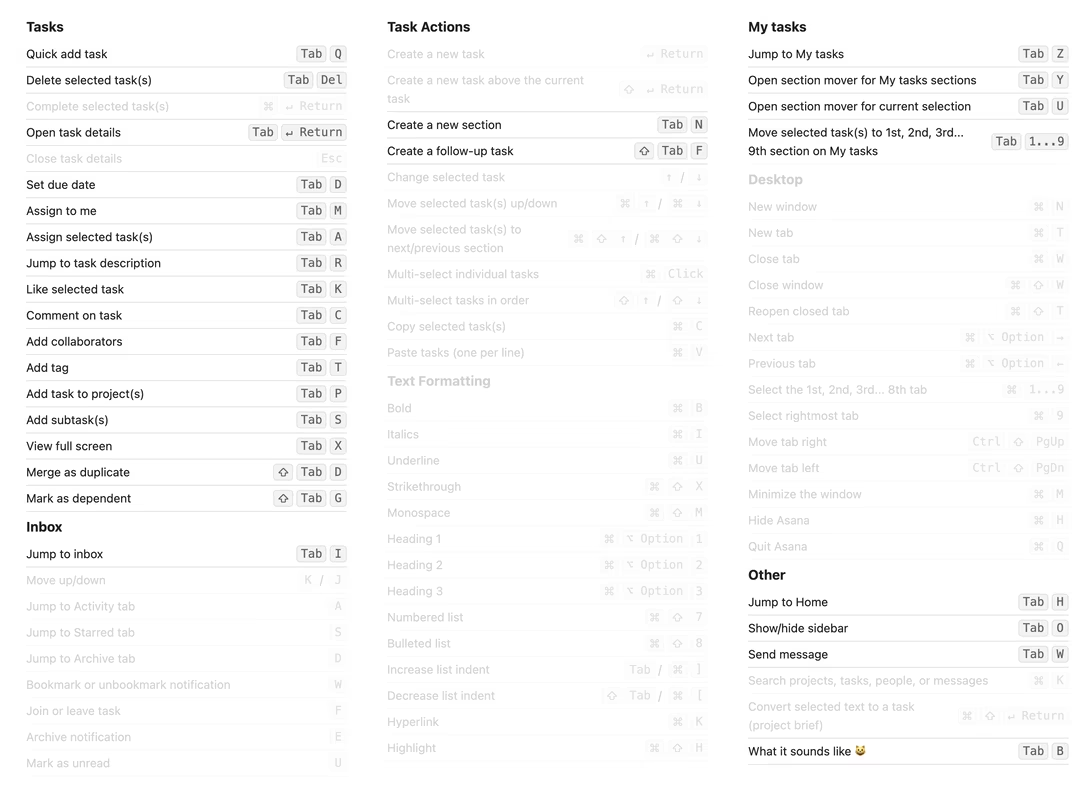
What’s fascinating about choosing Tab is that the key already has so much to do:
- it moves focus to the next UI control,
- it indents a bullet point or even just text,
- it accepts an autosuggestion or a placeholder (and similar things).
On top of that, repurposing a key to be a modifier key – especially one that already has a job or two – will also have a long tail of strange consequences. And, Tab is only on one side, which could wreak havoc with the ergonomics of keyboard use. (You are, technically, always supposed to use the modifier key with the opposite hand to the hand you’re pressing the main key with.)
But…
I am not ready to hate it quite yet.
Tab is not the worst key to use in this context, as it’s really the only available big key other than Caps Lock, which is impossible to mess with on the web. The other big keys – the spacebar, Return, and Backspace – would be radioactive for this purpose.
The asymmetry issue? Anecdotally, I understand that both right-handed and left-handed people most often use the pointing device (mouse or trackpad) with their right hand, and consequently often prioritize left modifier keys anyway.
Here is how Asana solves some other challenges:
- When you press Tab to move focus around, the action can now only take place on key up, not key down, so tabbing (or, indentation of bullet points) feels slower.
- When you hold a regular modifier key and then change your mind and simply release it, no action occurs. But Tab already has a job as a regular key (tabbing or indentation, depending on context), so if you change your mind, something will still happen. This might be annoying. (You can press Tab+Esc or Tab+Space for a safe cancel, but that doesn’t seem very intuitive, especially in a moment of panic.)
- An action only on key up also means there can be no repeat when holding Tab. I am not sure how important this is, especially in the context of accessibility.
What’s interesting and I bet the main reason Asana approached it this way, is that Tab is a separate little island, far away from other modifier keys – and thus not just without any preexisting conflicts, but also impossible to confuse with other modifier keys. Asana could have kept all the shortcuts above but substituted Tab with Ctrl on a Mac and Alt on a PC, but those would then be packed among many other similar-feeling keys.
(There is a price for this isolation, as Tab backfires the moment you have to combine it with other modifier keys. Asana doesn’t do it very often – I have only seen Tab+Shift+D, G, and F – but I wish they didn’t do it at all.)
Overall, I’m surprised how positively I feel about it. If you use Asana a lot, I’d be curious how Tab-based shortcuts feel to you. If you work at Asana, I would love to know if you consider these a success.
The only thing that seems to be missing is an option to go back to regular shortcuts if needed, for people who might want it for motor control reasons. (It is possible to achieve that with tools like Karabiner Elements, but that tool is really unpleasant to use.)
Oh, also. Tab+B does this, because, well, “tabby.” Cute.