Apple has developed an unexpected workaround to prevent the iPhone 18 Pro Max from being hit by shipping restrictions on big batteries. There’s a “battery-firmware solution” in place on the new iPhones, according to Apple’s support page, which keeps capacity below the 20Wh limit for single-cell batteries set by international shipping regulations — but this firmware lock automatically removes itself when the device is booted up for the first time. […]
If the user needs to send off their phone for repair or resale, the charging limitation can be restored using the “Prepare to Ship” feature, which caps charging to 80 percent for 14 days.
This is interesting, and reminds me of a category that should be present on Unsung more often – software fixing the sins of hardware.
Some years ago, the inimitable channel Technology Connections posted a 17-minute video about the peculiar design quirk of ceiling and room fans – they usually order their options Off → High → Medium → Low rather than the more natural Off → Low → Medium → High. The video is a bit off topic for this channel, but check it out if you’re interested how sometimes weird physics considerations influence design in the real world:
In the video, the host also talks about the more natural order that typically looked like this:
I wonder if you recognize this kind of an interface. I have a distinct memory of it from radios (where “zero volume” would mean “off”) and from TVs/early computer displays (where “zero brightness” meant “off,” too). There was something special about these controls that stuck in my memory, motor and otherwise: this tangible, heavy click when you ventured outside or back into “off,” almost as if you had to break the interface itself.
I thought this, too, was a convention from an old analog time. Yet, I keep occasionally finding the “the first notch is special” interfaces on screen.
Sometimes, they are pretty literal translations of the concept, like when you adjust the key repeat rate in macOS:
Or, similarly, when you choose the dock magnification:
But sometimes they are a bit more conceptual. Here, Nova treats the first notch of the zoom scale as a “list” option:
Or: The new horizontal tabs in Chrome allow you to resize to whatever width you want. Below 125px, however, they snap directly to the minimum 55px width, a one-off “column view” with streamlined and purely iconographic controls:
These all have pros and cons, too.
On the con side, just like the fan or volume controls, they miss any memory since turning them off physically moves the knob away from any “value”; if on/off was a separate button, you could just leave the radio at your preferred volume and never touch it again. They also won’t be as discoverable as a separate onscreen toggle would be. (Here’s an example of a more classic treatment from the Nothing Phone.)
Pros? They are compact. They allow you to change from “off” to a value in one quick gesture, skipping an explicit “on” step. You could even argue they are simpler also in a visual sense.
But also, they are a bit… magical. I don’t know. That’s what to me unifies those old physical controls and their newer digital equivalents – they’re a little extra, a little different, a little special. They break the monotony of a predictable interface built out of boring, identical components. (Although, sadly, not a single onscreen example above uses haptics!)
And I think that’s kind of nice. Not just in the very functional sense of breaking up the UI through shape coding etc., but also in a sense of making UIs more interesting.
Speaking of volume, macOS used to show it as a sort of a HUD, using a treatment that borrowed from both the “first notch is special” radio knobs, and from early onscreen interfaces in TVs:
But after 20+ years, macOS Tahoe changed it so it now looks this way:
I can understand the argument that this is more consistent, and that it even teaches you – by proximity – that Control Center is what these controls call home. Yet I can’t help but think (and it seems I am not alone) that this is so boring and exactly how Windows would approach things – and that this change, just like the squared icons, is how macOS lost one more bit of magic.
Here’s the best printer in 2023: the Brother laser printer that everyone has. Stop thinking about it and just buy one. It will be fine!
The Brother whatever-it-is will print return labels for online shopping, never run out of toner, and generally be a printer instead of the physical instantiation of a business model. […]
I am telling you to just buy whatever Brother laser printer is on sale and never think about printers again.
Patel did the same in 2024 and 2025 – you should check them all out if you want to smile, because they’re genuinely funny, as are some of the comments:
I’ve been using one of these for 6 years. The low toner indicator came on about 7 months ago. I bought new toner.
Reader, I haven’t replaced anything. It still prints fine, the new toner is still sitting on a shelf somewhere.
Least frustrating printer I’ve ever owned. Would buy again.
I’m sharing these on this ostensibly software-related blog not only because printer enshittification happens primarily via software. I wanted to share it also because this feels very similar to me to the post about TextEdit – a simple and deserved desire to own technology that works without any strange machinations, forced updates, and stress.
Past decades get compressed into a singular point in time, so we might all think of Selectric as “yet another old typewriter,” and I definitely did before learning about it. But the Selectric came 80 years after the first typewriters, and it packed so much user-benefitting innovation it really was an iPhone of its time. (Alas, I don’t believe there was a matching “are you getting it?!” keynote.)
Selectric was, honestly, a triumph of engineering. It popularized swappable typewriter fonts, showcased good industrial design, enabled jam-free typing, and even invented – although that came a decade after its introduction – an actual destructive Backspace. Crucially, on day one, its typing experience was so fantastic that many of the keys on keyboards we’re using 60 years later are still in the same place Selectric put them.
What’s even more impressive? Selectric was purely electromechanical. It had no software, no chips, and no electronics. Everything it has accomplished was expressed in the mechanical language of steel, grease, links, and levers.
Here’s one problem that’s trivial in software, but hard in hardware: How do you prevent people from pressing two keys at the same time?
This is a thing that plagued typewriters since day one, and IBM’s engineers came up with a smart solution: each key was connected to a bar (interposer), each bar had a little protruding notch (lug), and that notch would smoothly dip into a little horizontal row of steel balls (selector compensator tube).
The balls had just enough wiggle room for one notch, so if you tried to press a second key at the same time, the balls would now be packed tight, there would be no room to accommodate the second notch, and the key press would be blocked.
I thought that was really clever, but it was even more clever than that. If you read my essay, you know it starts with the very notion that fingers overlap: as one is going up, often another one is already pressing down. If you were to block any second press before the first press was completely done, you wouldn’t be able to type very fast – and Selectric was meant to be a professional typing tool.
Here’s where the choice of the carefully sized and arranged steel balls came into play. In practice, the second press was not completely blocked. The lug was able to slide just a little bit in between the adjacent steel balls. It was a half press – or, effectively, a half-character buffer. It was all fine-tuned just enough to not impede overlapping typing, while still offering protection from two keys at the same time.
Now, if Selectric did this, in a universe where creating even a half-character buffer meant a little row of carefully machined steel balls, and added weight, and anticipating future wear and tear, and multiple pages in the maintenance manuals… what’s your excuse?
Love seeing real work in progress like that, plus it ends up in a place I didn’t expect.
It was also great to see “delay and snap” action elucidated so clearly. It feels like a variant of rubberbanding (or, elastic scrolling) where you intentionally disconnect an object from the cursor or finger dragging it.
I keep thinking about MacCharlie, this strange product from 1985 that turned the original Macintosh into a dual-purpose machine that could also run software by its chief competitor, early PCs:
I’m fascinated by it because it almost feels like cargo culting: “hey, PCs are big and ugly, so if we make a Mac big and ugly, it must turn into a PC.”
Of course, there was more method to this madness, and two alien cocoons wrapped around the Mac and its keyboard actually have the correct technology, but still – what an absolutely soul-sucking experience: an ugly on/off switch, ugly disk drives, ugly, slightly misaligned elements, ugly, ill-fitting, slightly off-color plastics, even ugly colors for key legends.
(Okay, I liked one thing – the embossed Dayna logo matching the Apple’s.)
This was not a novel idea. Those kinds of matryoshkas happened to computers before, and are still happening to computers today:
There even exists a concept of a “naked robotic core” – devices designed specifically to welcome more infrastructure around them. Here’s an example from the professional cine camera world…
…but your smartphone with MagSafe is gesturing toward this idea, too.
This is not limited to hardware, and it is in software where things get really interesting to me. Here’s a thing I saw the other day when installing some keyboard modification software:
The top is the native macOS interface. The bottom, including those arrow tendrils, comes from the interested app, trying to walk me through the process using some overlaid coach marks.
Or, this is something I saw on my Windows laptop. Putting aside none of this was what I gave consent for – again, top is native, bottom comes from McAfee:
Those adornments, whether “white hat” (like the keyboard tool), or “gray hat” (like the McAfee), all feel equally desperate and hopeful.
Desperate, because if this is the best idea, there are no good ideas. You can almost feel developers gritting their teeth, saying “I can’t believe we have to do this.”
Hopeful, because – well, you’re skating where you hope the puck will remain. At least the hardware, once mounted, cannot morph into something else. But the software appendage you create doesn’t really know how the host organism will evolve. Even a singular word change in the original UI can throw everything out of balance. This is no software proprioception where you control both sides of the equation and can re-synch them when either needs to evolve.
Okay, I imagine if you think ahead enough, and have an appropriately vivid imagination, and a robust QA process set up so you can react immediately when the host changes its UI from under you, you might get something passable.
But I think it will be hard. Sure, McAfee’s pop-up didn’t even try so its approximation of the “Enable extension” button is basically laughable – but CustomShortcuts did, and even then, the rounded corners and the shadows don’t quite match.
I think this is the foundational disadvantage of this kind of an approach. I imagine there are much worse and more nefarious “black hat” examples than the McAfee callout I showed above, but even without that, shoddy facsimiles of things are all around us – fake text messages from fake support centers, fake smartphone pop-ups telling you to update your OS – and we learn not to trust them. And this kind of UI inevitably starts as a shoddy facsimile. You can pull it, with effort, to be something better, but it will never forget its roots.
Here’s another “white hat” example:
This is from Raindrop. Again, you can sense some pretty understandable desperation as presumably iOS doesn’t allow you to add the highlighting and annotating commands to its top toolbar – hence additional, bottom toolbar.
I consider Raindrop a generally well-made app, but you can immediately feel a certain maccharlieness of it all here – what was mismatched plastics in the 1985 is mismatched liquid glass effects in 2026.
And, on top of all that, once in a while, disaster strikes:
A funny and occasionally spicy 15-minute video by Nerrel from October 2024 about some of the nuances and legal fights surrounding Nintendo’s fight with community-made emulators:
The video paints Nintendo in the harsh light, highlighting their double standards and willingness to throw their corporate legal weight around just to squash the challenges before they go to court, despite court precedents ruling against them.
The video also talks about software preservation – this is the part that feels very important to me – and I also learned things about piracy, DCMA, and modern video game encryption.
Just to highlight the versatile value of emulation, in another corner of the emulation universe, I found this fascinating project: a web page called Yes we scan, made by George MacKerron, that promises scanning directly from the browser – for example if you have an old scanner unsupported by your modern OS.
And… it actually works! It combines WebUSB with an interesting technique:
Your web browser emulates a whole PC running Linux with open-source scanning software (SANE). It connects that to your scanner via WebUSB.
If you are interested, the details page has more… well, details. MacKerron also wrote Printervertion that allows you to print directly from web, too, even if your operating system abandoned your vintage printer. The way I understand this, both efforts basically invite an alternative operating system that might be more supportive to take a stab at scanning or printing, and do it in a friendly and sleek way through emulation. It’s kind of incredible this is even possible.
Turns out that the breathing light survives, sort of, not really, in an Apple product today:
The AirPods Pro case does this when charging – right at the start, or when you tap it later. But it disappears after a while, the pace is now 28 breaths a minute (over twice as fast as the original iteration), and the light is orange.
Is it still the same thing, reflecting on how smaller organisms breathe faster? Or is it mostly an unrelated idea, with the light fading in and out indicating activity rather than lack of it? My money is on the latter – the light turns white when pairing, too, and it cycles even faster then – but it was nice to imagine the return of the old feature for a second or two… or 2.1, to be precise.
I understand that the best way to compare two things visually is to switch between them promptly in situ; our visual system is really good at spotting even small changes when aided this way.
I thought it would be fun to talk about it briefly, because it gives me a chance to show you a really fun device:
This is a blink comparator, an apparatus built for astronomers to easily flip between two images of the night sky, taken at the exact same position some time apart.
It makes it easy to spot a moving asteroid, like in this set of two photos:
(Pluto is the blinking dot a bit to the top and to the right from to the center – that dot moves to the left in the other frame. The fact that it moved at all made it an object of interest, but it didn’t traverse the sky like an asteroid or space debris would.)
This is why the “spot 10 differences” puzzles are always shown side by side…
…otherwise everything would be much, much easier to spot:
Today, this kind of stuff doesn’t require complex devices, but it’s useful to know the principle.
If you’re comparing a reference design with its implementation, instead of measuring things on both sides it can help to align them in two windows, and then switch between them using ⌘Tab.
If you’re working on an interface for users to see differences between two images – don’t (just) show them side by side, but also allow your users to flip between them this way. And, resist the very natural urge to add any transitions that would seem to be nicer and friendlier; it is sharply switching between images that is the most effective.
This 9-minute video from PetaPixel probably won’t make much sense for non-photographers, but there is something refreshing about this idea that there are still places where adding software is seen as positive:
The video talks about Tamron’s lenses which have their own software (independent of the camera), and even their own USB-C port.
In a camera lens equivalent of fly-by-wire, the software allows to fine-tune the behaviour of hardware: what should soft buttons do, should the focus ring be responding in a linear or not, or even in which direction should it rotate. However, there are also more complex behaviours – like time lapses with focus pulls – with an interesting interface that’s definitely not beautiful, but I think still worth checking out for how it uses skeuomorphism.
It was fun to see one of the most well-crafted of early arcade games, Tempest, in this kind of a view, with the stud reimagined as a paddle controller:
The M2x2 is a functional homage to the classic Lego computer brick, upscaled and re-imagined as a high-performance workstation. […]
If our tools could look as playful as the things we built as kids, would we approach our work with more joy? The M2x2 is just the beginning of a workspace that feels less like an office and more like a laboratory for breakthroughs.
But both of these are enlarged Lego bricks. Three years ago, James Brown a.k.a. Ancient made an effort to embed an LCD screen in a regular-size Lego brick. It’s a fun 12-minute video of the construction process:
But the most amazing to me outcome was this video, called “Busy little screens”:
A lot of diversity of the original bricks is gone, but it’s hard to expect Brown to recreate and animate them all. It’s a mesmerizing thing to watch nonetheless; one can almost taste a future where the technology will allow for Lego bricks to be animated, but look exactly as they originally did.
The breathing light – officially “Sleep Indicator Light” – debuted in the iconic iBook G3 in 1999.
It was originally placed in the hinge, but soon was moved to the other side for laptops, and eventually put in desktop computers too: Power Mac, the Cube, and the iMac.
The green LED was replaced by a white one, but “pulsating light indicates that the computer is sleeping” buried the nicest part of it – the animation was designed to mimic human breathing at 12 breaths per minute, and feel comforting and soothing:
Living through that era, it was interesting to see improvements to this small detail.
The iMac G5 gained a light sensor under the edge of the display in part so that the sleep indicator light wouldn’t be too bright in a dark room (and for older iMacs, the light would just get dimmer during the night based on the internal clock).
In later MacBooks, the light didn’t even have an opening. The aluminum was thinned and perforated so it felt like the sleep light was shining through the metal:
And, for a while, Apple promoted their own display connector that bundled data and power – but also bundled a bit of data, which allowed to do this:
Back when I had a Powermac G4 plugged into an Apple Cinema Display, I noticed something that was never advertised. When the Mac went to sleep, the pulsing sleep light came on, of course, but the sleep light on the display did too... in sync with the light on the Mac. I’ve tested that so many times, and it was always the same; in sync.
Just a little detail that wouldn’t sell anything, but just because.
To do this I shifted the first gaussian curve to that its domain starts at 0 and remains positive. Since the time domain is 5 seconds total and the I:E ratio is known, it was trivial to pick the split point and therefore the mean. By manipulating sigma I was able to get the desired up-take and fall-off curves; by manipulating factor “c” I was able to control for peak intensity.
But at that point, in the first half of 2010s, the breathing light was gone, victim to the same forces that removed the battery indicator and the illuminated logo on the lid.
I know each person would find themselves elsewhere on the line from “the light was overkill to begin with” to “I wished to see what they would do after they introduced that invisible metal variant.”
I know where I would place myself.
This blog is all about celebrating functional and meaningful details, and there were practical reasons for the light to be there. This was in the era where laptops often died in their sleep – so knowing your computer was actually sleeping safe and sound was important – and the first appearance of the light after closing the lid meant that the hard drives were parked and the laptop could be moved safely.
The breathing itself, however, was purely a humanistic touch, and I miss that quirkiness of this little feature. If a save icon can survive, surely so could the breathing light.
One of the most potent themes in Stanisław Lem’s writing was the fallacy of first contact.
Lem argued that we are just not ready for an actual meeting with something truly alien. That the most open-minded of us are close-minded on a cosmic scale. That sci-fi made us think that aliens will look like human with prosthetics when good, and insect-like creatures when evil, but sci-fi needs to be self-constrained for all the same reasons; showing us something actually inhuman will immediately render it utterly incomprehensible.
He wrote about it in Eden, and Solaris, and The Invincible, and Fiasco. The last of these is a book I was once so angry at that I threw it at the wall.
It also happens to be my most favourite book, ever.
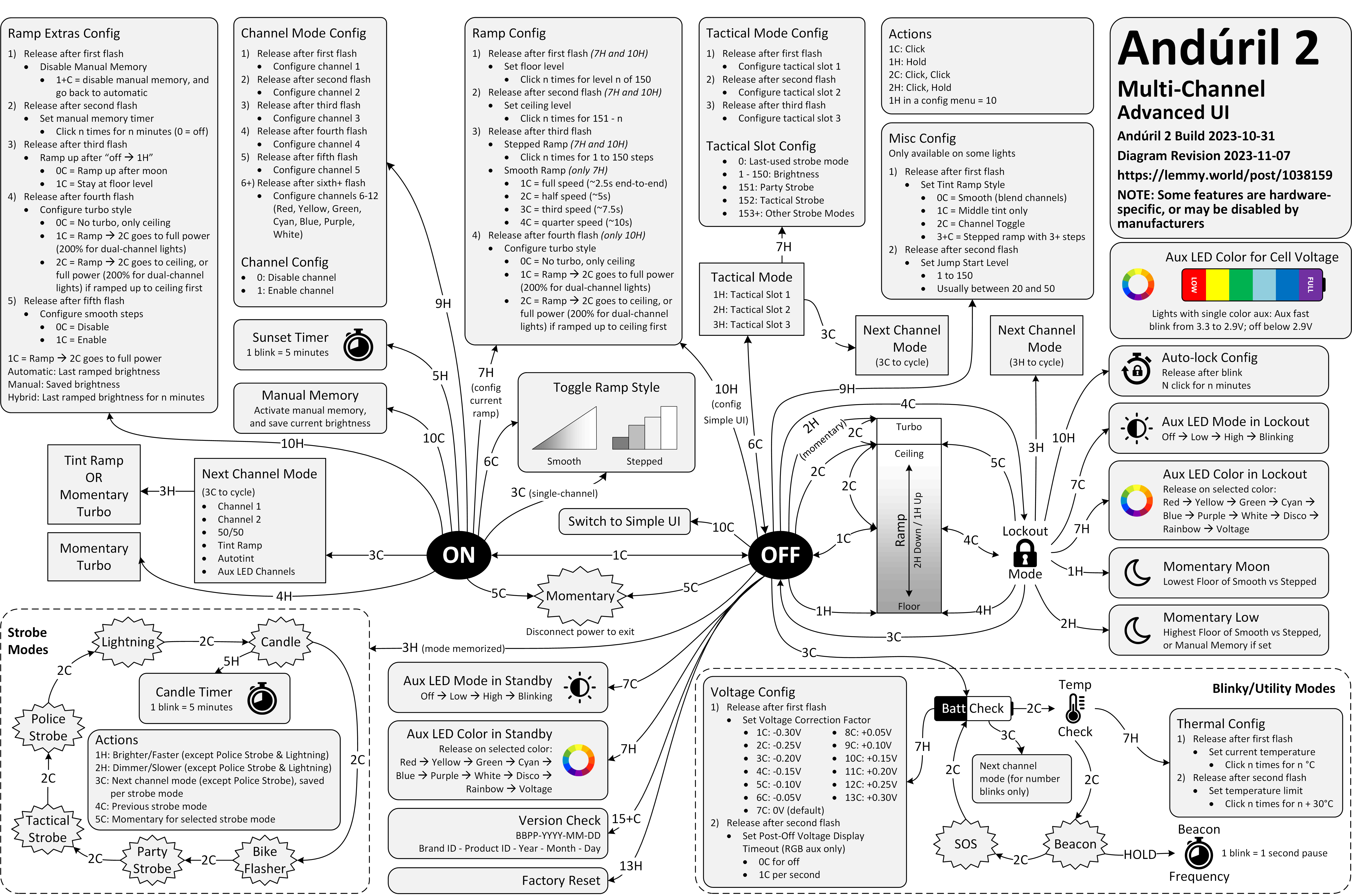
Anyway. This is a diagram for a single-button flashlight called Andúril 2 (larger version):
I saw it for the first time earlier this week. I was speechless. Maybe a little bit in awe. I know I’m supposed to hate this, but this feels so profoundly… alien, that I don’t know if anything I know applies here. I don’t want to judge it by the wrong set of rules. I want to understand the dividing lines between the UI and its explanation. I want to study it more.
Oh, and because I was curious too – this is the flashlight:
Speaking of hardware: Always loved this 1998 Australian story (magazine scan or an easier-to-read transcription) of a very particular computer virus that did not require any software to spread “like a Sydney bush fire”:
Now it all became clear. One of the female sockets must have deformed when I first reconnected the CD-ROM burner. This forced the two pins into the same hole and shorted them out. Later when this cable was plugged into the JAZ drive, the pins, now bent to go into one hole, deformed the female connector on the JAZ drive. Again pushing the separating plastic over the hole. Plugging another good cable into this newly damaged socket caused the pins of the new cable to be forced together and short, and when this new cable was inserted into the good SCSI socket on the new JAZ drive it did more damage to it. Before I knew it I had four damaged sockets and three bad cables.
I believe the cables and sockets looked something like this:
The story ends with:
I am only glad the [hardware] virus was contained and did not spread to the rest of the world! Can you imagine if this sort of thing happened in a big computer assembly plant?
A fascinating deep dive look at one of the most well-known bugs in computing history, the 1993 Pentium FDIV bug. Ken Shiriff actually grabbed a microscope to analyze the processor and mapped out exactly what happened on the hardware level, and the details of Intel’s (surprising) fix.
Also, an interesting detail of what ended up being Intel’s self-own:
The problem might have quietly ended here, except that Intel decided to restrict which customers could get a replacement. If a customer couldn’t convince an Intel engineer that they needed the accuracy, they couldn’t get a fixed Pentium. Users were irate to be stuck with faulty chips so they took their complaints to online groups.