Guardians of the gestures, pt. 1
When you use Figma, you can press ⌘R to rename any object:
Even if you hide the left pane interface, ⌘R still works – now, the label itself becomes the input field (it even shows up if not normally visible for secondary objects):
And, when you select multiple objects and press ⌘R, you get this dialog, allowing you to write down more explicit rename rules for the entire group – maybe number them sequentially, maybe just remove one word while keeping the other ones intact:
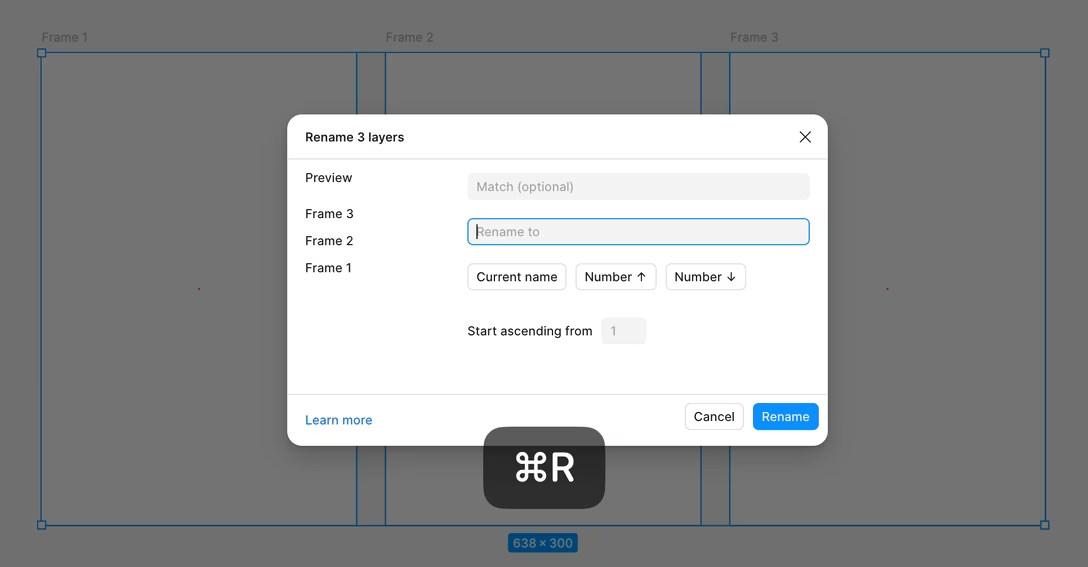
I don’t love this dialog and I think it could use a revision, but I didn’t want to talk about its details here. What I wanted to mention is that even here, you can still simply and mindlessly type a new name and press Enter – and all the frames will be renamed to this name:
This was a deliberate design decision. Either one of these three modes supports the most barebones version of the interaction: new name first, Enter to confirm second. As a user, you should not care whether the UI is visible or not, and if the gesture to rename one object works, your fingers will expect it to work for many objects, too. Motor memory just doesn’t want to think too hard. Motor memory loves things to be deterministic.
It was nice to see this principle employed by the recently improved Apple Notes, as well.
In TextEdit and a lot of other software, you can use ⌘K to linkify a piece of text. The interface is often very, very simple, often showing you just a field to input the URL:
The troika of keyboard actions – ⌘K to add a link, ⌘V to paste a URL, Enter to confirm – has been reliably working like this since the 1990s, when the freshly blue and underlined links were the talk of every town. I bet many people linkify using this gesture not thinking of the three keystrokes they’re making in precise sequence, and as a matter of fact, often not thinking about it at all.
Apple Notes added a few more link options recently: linking to other notes, linking deeper inside a specific note, changing the name of the link. The window reflects the extra functionality (and complexity), but the rudimentary, almost atavistic gesture – ⌘K, ⌘V, Enter – has been protected…
…and I’m grateful to the guardian who made sure it was.