In between the lines
Over the years, I acquired this weird collection of almost-invisible, but important signifiers of when I know a product really focuses on craft and thinks about its users.
I thought about one recently. Here’s what happens when you try to copy a long block of text from YouTube’s (otherwise very useful) text transcript pane:
And here’s an analogous example from GitHub:
GitHub’s arrives ready to go. YouTube’s throws in a lot of messy things in between the lines.
Why does it matter? Because these both feel like places you’ll be copying a lot from, and dealing with a messy paste can feel so, so unpleasant.
You have probably seen this chart before, from xkcd:
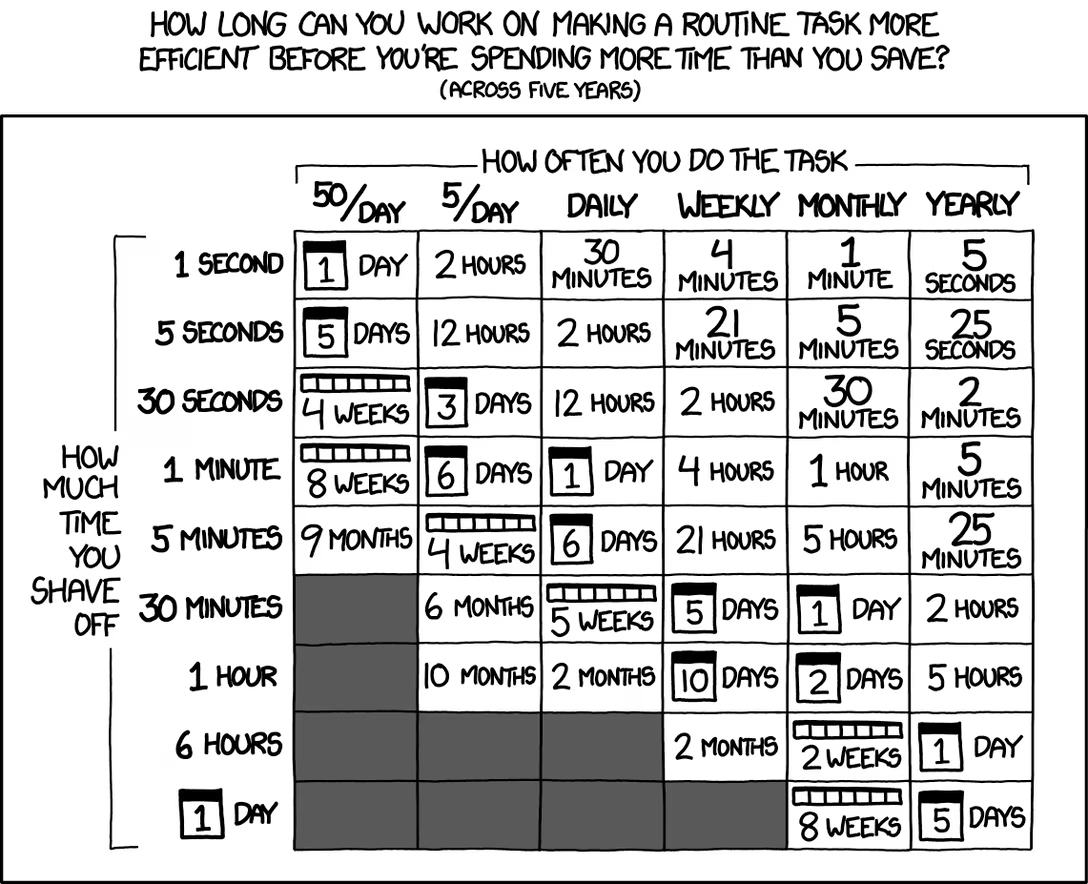
This is the fabled automation trade-off, or the high fixed cost vs. low variable cost dilemma.
Yeah, if you’re doing a lot of copy/paste, you might invest in creating some sort of a clean-up step, or even going through a programming text editor which has multiple cursors or other casual automation. But what if you don’t do that often, or if you don’t even know how much time it’d take you to automate it? Then the investment seems scary or insurmountable, and you’re stuck doing something like this, time and again:
And it’s really nice to encounter a place like GitHub, where the team was thoughtful enough to save you all this trouble.
There is also an asymmetry that’s worth pointing out. I believe making this good doesn’t have to be a lot of work for people putting these surfaces together. Here’s me fixing the YouTube situation with two simple lines of CSS with user-select: none:
I don’t know if it’d be as easy for all big text block situations, but I think it’s good practice to look around a bit and think about what are tiny things that you can do on your side that will save your users minutes or hours of tedium (see also: recents and paste and even more recents).