“This is a sphere getting exponentially angrier as time passes.”
When you learn computer science, at some point you encounter floating-point numbers in all their peculiar glory. Floating-point numbers allow you to store values that are extremely huge or extremely tiny, but that comes with a strange price. The number is still just a number with a regular limited precision, but is accompanied by a floating point – another number that just says how many zeroes to put after or in front.
In effect, when your number is millions, you get a precision of thousands. When your number if billions, you can only count in millions, and so on. This makes intuitive sense, in a same way a billionaire doesn’t care about pocket change. (Go to a floating point visualizer, and you will see you can input 9000004 and 9000005 and 9000006 with no problem, but add one more zero and 90000004 will be rounded down to 90000000, and 90000005 up to 90000008. Bigger numbers get even less precise.)
This has a strange effect when it comes to videogames or graphic software: The further you move something away from the origin of your universe – where X and Y are 0 – the more you have to worry about its internal precision.
This is not a problem in real world. You can send a tiny, incredibly meticulous watch screw far beyond the solar system and back, and it will do fine. But now jump to the digital world, assume Earth is 0:0 – apologies to Copernicus – and now the further away you go, the more the floating point moves to the left, and at some point the precision of the number on the other side runs out; a value that can express billions of kilometers is too coarse to even consider millimeters.
This is a fascinating problem which is visualized nicely in this short video. This is what happens when you move an object with its constant internal precision further and further away:
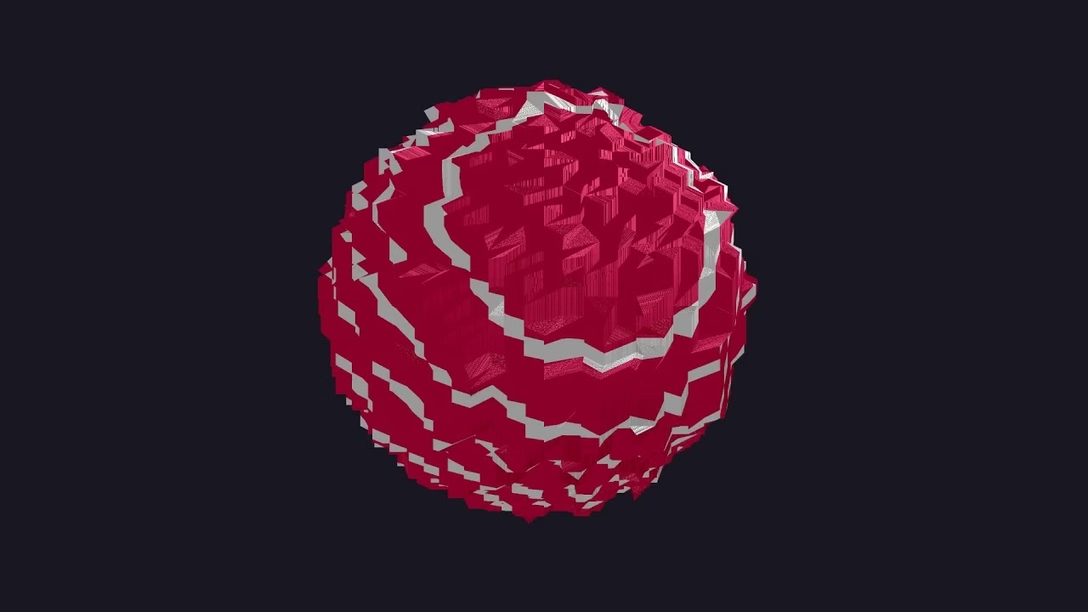
There are ways around this – you can increase the precision, introduce a “floating offset,” have two precision centers around two floating points, or do a bunch of other things – but each one will cost you. So, sometimes, the best solution is the simplest one: do not allow the numbers to get too big.
And this is why Adobe Illustrator, Figma, and I bet at least a few other tools that promise infinite canvas, actually stop you if you stray too far away from the center. Precision is like atmosphere, the canvas says, thinning out the further you go. We cannot promise your structural integrity will survive going past a certain point, so we won’t allow you to do that.
Here’s Figma, where I at some point the canvas stops following your scroll commands:
The first invisible X value is 131,072 and it’s not a surprise it’s one of these numbers that will look very, very familiar.
It seems like a huge enough value, but if you consider a slide in a slide deck is 1920×1080, it’s not as infinite as it might initially seem. And this is also why – in part – Figma Slides manually wraps you after 20 slides: